

Download XLS Editor – Free, Secure & Fast Excel File Viewer & Editor for Windows, Mac, Android & iOS
Effortless Spreadsheet Management with XLS Editor
Looking for a reliable, fast, and user-friendly way to work with Excel files without the need for Microsoft Excel? XLS Editor is your go-to solution. This powerful software allows you to create, view, edit, and save both .XLS and .XLSX files—supporting all major spreadsheet formats used in business, education, and personal projects. Whether you're a student updating a grade tracker, a freelancer managing invoices, or a team leader tracking budgets, XLS Editor streamlines your workflow across multiple platforms.
One of the standout features is its seamless compatibility with Microsoft Excel, ensuring that your files remain intact when shared or transferred. Unlike some third-party tools that distort formatting or break formulas, XLS Editor preserves every detail—from cell alignment and font styling to complex calculations and conditional formatting. The app is especially valuable for users who work across different devices or collaborate in shared environments. With support for Dropbox and OneDrive (SkyDrive), you can access your spreadsheets in real time, edit them on the go, and sync changes instantly.
Designed with both touch and non-touch interfaces in mind, XLS Editor delivers a smooth experience whether you're using a Windows PC, Mac, Android tablet, or iOS smartphone. The intuitive layout and responsive controls make it easy to navigate, even for beginners. Plus, with built-in features like automatic backups and an undo function, you can work with confidence, knowing that mistakes can be quickly reversed. Whether you're in the office, at home, or on a bus, XLS Editor ensures you never miss a beat in your productivity journey.
Powerful Features for Every User
What sets XLS Editor apart from other spreadsheet tools is its rich feature set that combines functionality with ease of use. Here’s what you get when you download this versatile software:
- Full .XLS & .XLSX Support – Open, edit, and save files in both legacy and modern Excel formats without conversion errors.
- Formula & Function Compatibility – Work with common Excel functions like SUM, IF, VLOOKUP, and more—no need to rewrite your calculations.
- Touch-Optimized Interface – Pinch-to-zoom, swipe navigation, and responsive buttons make tablet and smartphone use effortless.
- Cloud Integration – Direct access to Dropbox and OneDrive for real-time collaboration and file sharing.
- Advanced Formatting Tools – Customize fonts, colors, alignment, word wrap, and cell borders with precision.
- Graph & Chart Creation – Insert line, column, scatter, and stacked charts with drag-and-drop simplicity.
- Password Protection – Secure sensitive spreadsheets with password encryption for privacy.
- PDF Export – Share your data with non-Excel users by exporting to PDF with perfect formatting.
- Auto-Save & Undo History – Prevent data loss with automatic backups and a multi-level undo system.
These features are not just impressive on paper—they deliver real-world value. For example, a marketing team can update a campaign performance sheet during a meeting using their iPads, while a project manager can review inventory levels from their Android phone. The ability to switch between formats on the fly also helps avoid compatibility issues when sharing files with colleagues using different Excel versions.
Easy Installation & Cross-Platform Usage
Getting started with XLS Editor is quick and hassle-free. Whether you're on Windows 10/11, macOS, Android, or iOS, the download process is straightforward. Visit the official website, choose your platform, and follow the simple installation wizard. The setup takes less than two minutes, and you're ready to open your first spreadsheet.
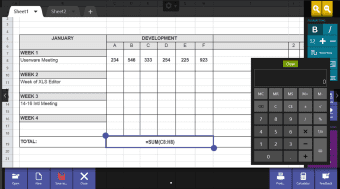
Once installed, launching the app is intuitive. Simply open the file browser, locate your .XLS or .XLSX file, and click to load it. You’ll be greeted with a clean, organized workspace that mirrors Excel’s layout but without the clutter. Use the ribbon-style toolbar to access formatting, formulas, and chart tools. For touch users, gestures like pinch-to-zoom and swipe-to-scroll make navigation fluid and natural.
For teams, the real power lies in cloud integration. By linking your Dropbox or OneDrive account, you can open shared spreadsheets directly from the app. Any edits you make are automatically synced, ensuring everyone sees the latest version. This is perfect for remote teams, students working on group projects, or freelancers collaborating with clients. Plus, with automatic backups enabled, you’ll never lose work due to crashes or accidental deletions.
Pros & Cons: Is XLS Editor Right for You?
Before downloading, consider the following pros and cons to determine if this tool fits your workflow.
✅ Pros
- Supports both .XLS and .XLSX formats with full compatibility
- Fast, responsive interface across all devices
- Seamless cloud integration with Dropbox and OneDrive
- Intuitive touch and mouse controls for all users
- Advanced features like formula support, charts, and password protection
- Free trial available with no credit card required
- Automatic backups and undo functionality for safety
❌ Cons
- Limited advanced analytics compared to full Excel
- No built-in collaboration chat or real-time co-editing
- Some complex macros may not be fully supported
- Free version has limited export options
Overall, XLS Editor excels as a lightweight, secure, and cross-platform alternative to Microsoft Excel—ideal for users who need to view and edit spreadsheets on the go, without the overhead of a full office suite.
Frequently Asked Questions (FAQ)
Here are answers to common questions about XLS Editor:
-
Can I edit Excel files without having Microsoft Excel installed?
Yes, XLS Editor allows you to open, edit, and save .XLS and .XLSX files even if you don’t have Microsoft Excel installed. It’s perfect for users on budget devices, students, or those who prefer lightweight tools.
-
Is XLS Editor free to download and use?
Yes, XLS Editor offers a fully functional free trial. While the free version includes most core features, premium upgrades unlock advanced export options, cloud sync enhancements, and priority support.
-
Does it work on Android and iOS devices?
Absolutely. XLS Editor is available for both Android and iOS, with a touch-optimized interface designed for smartphones and tablets. You can edit spreadsheets on the go with full functionality.
-
Can I export my spreadsheet to PDF?
Yes, one of the key features is the ability to export your spreadsheet to high-quality PDF format—ideal for sharing with clients, archiving, or printing.
-
How secure is my data when using cloud storage?
XLS Editor uses industry-standard encryption for files stored in Dropbox and OneDrive. Your data remains secure and private, and you maintain full control over access permissions.
Final Verdict: A Must-Have Tool for Modern Productivity
If you're tired of compatibility issues, expensive software licenses, or being tied to a single device, XLS Editor is the perfect solution. With its powerful features, cross-platform support, and secure cloud integration, it empowers users to work smarter, not harder. Whether you're a student, professional, or small business owner, this tool helps you stay productive from anywhere.
Don’t wait—download XLS Editor today and experience seamless spreadsheet editing across Windows, Mac, Android, and iOS. Try the free version now and see how it can transform your workflow. With regular updates, a user-friendly design, and strong security, XLS Editor is more than just a tool—it’s your digital spreadsheet partner.
? Download XLS Editor now and take control of your data—fast, free, and secure!







